From demo to platform
SignalOps started in July as a dense data-UI study: a synthetic 10,000-job cockpit to prove virtualization, derived state, and guided replay. That cockpit still exists — honestly labeled, still useful for the replay walkthrough below.
Since then it grew into a working telemetry platform in its own right: a public beta at signalops.cc with self-serve workspace activation, developer docs, a live status page backed by real readiness probes, and an ingestion path that other products integrate against. The demo-to-platform split is deliberate — the synthetic cockpit demonstrates UI mechanics; the platform demonstrates contract design, ingestion safety, and operational truth.
The pitch
Image-generation infrastructure runs across multiple providers — fal.ai, Google AI, Alibaba/Qwen — and each one fails differently: latency spikes, retry storms, cost bleed from silent retries. An operator needs to notice the problem, trace it to affected jobs, draft a mitigation, see the projected impact, and hand it off. Most dashboards stop at "something is red." SignalOps closes the full loop.
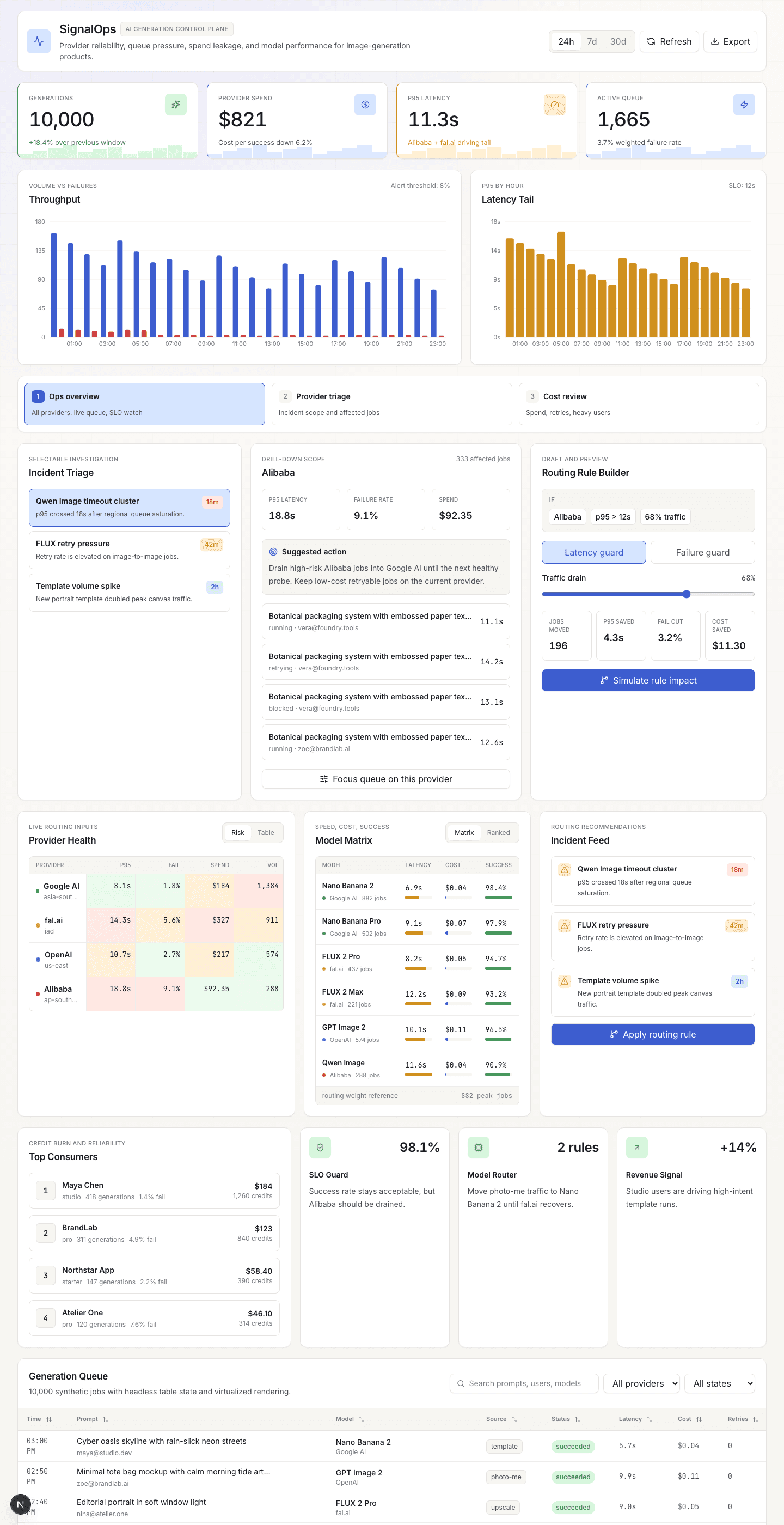
The main screen is a decision surface: provider health cards, live KPI tiles, an incident timeline, a 10,000-row job queue, and a routing-rule builder that previews impact before you commit. Every control drives shared React state, so changing a filter or sliding traffic share re-renders charts, cards, and tables from the same source.
A telemetry contract with teeth
The core of the platform is Canonical AI Telemetry V1 — a vendor-neutral event contract with five lifecycle boundaries: operation accepted/terminal, attempt started/terminal, and optional provider probes. Every retry and fallback gets its own attempt ID; every operation ends in exactly one terminal state. The contract rejects privacy-hostile payloads at the boundary: prompts, media, identities, URLs, raw errors, and stack traces are removed or rejected, so clients can integrate without a data-leak review.
Ingestion safety is designed, not asserted:
- Zero-storage validation. A public
/validateendpoint and playground accept arbitrary events, run the full contract check, and persist nothing — validation failures and duplicate retries never become billable usage. - Token-authed ingest. Protected writes go to
/v1/eventswith scoped, owner-revocable keys, idempotent event IDs, and tenant isolation, landing in Postgres through checked-in migrations and RPCs. - CI exercises the real database. The pipeline runs migrations and stored procedures against a Postgres service container — the storage layer is tested, not mocked.
- SLOs and incidents on top. Service-level windows, incident workflow, and a spend-efficiency lens that reports its own coverage instead of implying complete totals — the cockpit stays truthful for low-volume tenants too.
Phosphene as the first producer
The first real producer is Phosphene, my AI image product. Integration goes through a public Node producer adapter and a conformance suite that any future client uses — no private back doors. The ownership boundary is explicit: Phosphene owns execution, providers, prompts, and identity; SignalOps stays observation-only and cannot select, disable, or reroute a Phosphene provider. Production delivery rides Phosphene's durable outbox, so telemetry commits atomically with the lifecycle change it describes.
Guided incident replay
The feature that separates SignalOps from a static dashboard is guided incident replay: a step-by-step walkthrough that drives the real dashboard controls from a script instead of manual clicks. Three scenarios ship today:
- Alibaba p95 spike — critical latency tail on Qwen Image after queue saturation
- FLUX retry storm — elevated retries on fal.ai image-to-image inflating failure rate
- Qwen cost bleed — the same latency incident seen through a finance lens, where retries burn credits
Each scenario advances through five steps: signal → affected jobs → draft mitigation → projected KPI delta → export handoff. Every step sets concrete dashboard state (saved view, provider filter, trigger mode, traffic share, routing applied), so the operator sees the same controls move as if they were operating them by hand.
Guided replay · Alibaba p95
Incident → triage → routing decision
Alibaba p95 spike
The replay selects the Qwen provider alert and opens the incident context that started the investigation.
scenario: alibaba-p95 · provider: Alibaba
The replay runs on the synthetic dataset and says so — it demonstrates the UI mechanics, not production traffic. It still drives the real TanStack Query hydration, the real TanStack Table + Virtual row rendering, and the real Recharts memo-derived series. A typed event timeline feeds the same store the dashboard renders from — same reducers, same derived state, no parallel "demo mode" rendering path.
Saved views and the routing builder
Three saved views reframe the same data without changing route:
- Ops overview — all providers, live queue, SLO watch
- Provider triage — incident scope and affected jobs, filtered to the flagged provider
- Cost review — spend, retries, heavy users, shown through a finance lens
The routing-rule builder sits inside the investigation flow. It offers two trigger modes (latency guard, failure guard), a traffic-drain slider, and a live impact projection: jobs moved, p95 saved, failure-rate cut, cost saved. The impact numbers recompute as the slider moves, because they derive from the same memoized data that feeds the charts.
Stack decisions
TanStack Table + TanStack Virtual over a dropped-in enterprise grid. The generation queue hits 10,000+ rows. TanStack Virtual keeps only visible rows mounted, and TanStack Table gives column-level control over sorting, filtering, and status badges without pulling in a heavy grid framework.
Recharts for charts. The latency timeline, throughput area chart, spend donut, and performance scatter all share memoized series derived from the same snapshot. One useMemo per chart series; no duplicate data fetching.
Framer Motion for replay transitions. Each replay step animates in/out with AnimatePresence, so the narrative panel and step rail feel like a guided presentation rather than a form submission.
One source of truth for dashboard state. Saved view, provider filter, job status filter, trigger mode, traffic share, and routing-applied flag all live in a single state object. The replay sets this state; manual controls set the same state. Charts, KPI cards, and the table all read from it. No shadow state, no stale closures.
Contract-first I/O. Every inbound event is schema-validated at the boundary before it can touch storage, and the same validation is exposed publicly so integrators can test against the exact gate the server uses.
What it shows
- Contract design as a product skill: five lifecycle boundaries, a privacy gate, and idempotent ingest — designed once, integrated by an external producer through a conformance suite.
- Honest data plumbing: zero-storage validation, tenant-isolated Postgres persistence exercised in CI, and cost reporting that discloses its own coverage.
- Dense data UI: provider health, KPI tiles, timeline, 10k-row virtualized table, five chart types, and a rule builder in one viewport.
- One source of truth: replay and manual controls drive the same state; charts and tables derive from it without shadow paths.
Why this exists
Phosphene is the product; SignalOps is the observability layer such a product actually needs once it runs across paid providers. It began as a frontend craft study and kept the craft — virtualization, derived state, guided replay — while growing the parts that are usually faked in portfolio projects: a real contract, real ingestion, real storage, and a public surface that reports its own readiness. The demo says it is a demo; the platform says what it sees.